
Creating Product Photos With AI
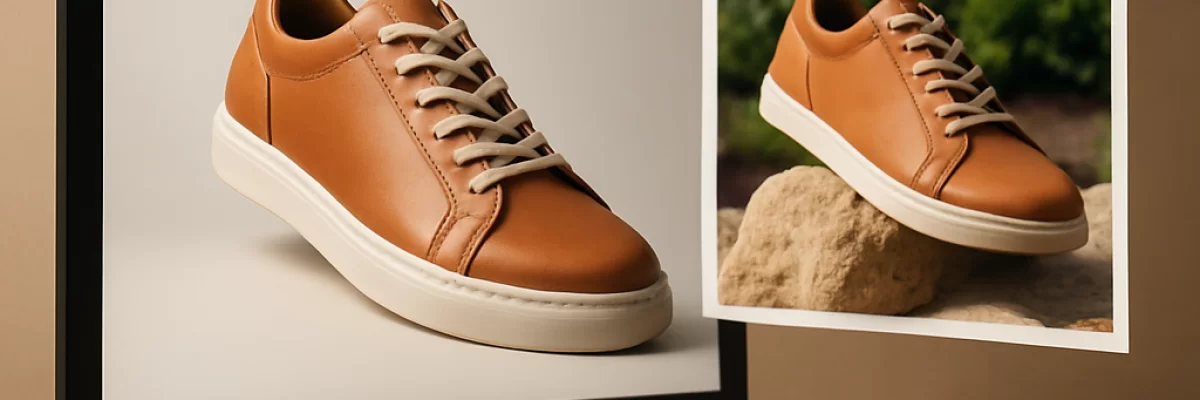
Where AI helps with product photos
AI product photography works best as an editing and variation process rather than a completely automatic replacement for product photography. Start with an approved image of the actual item, then use AI to change the setting around it or prepare alternative versions.
Useful tasks include:
- Removing or replacing a background
- Placing a product in a lifestyle scene
- Creating seasonal or promotional settings
- Extending an image to fit a wider or taller crop
- Producing alternate compositions for stores, advertisements, and social channels
- Generating early concepts before commissioning a professional shoot
Some applications combine generation and editing in one interface. For example, AI product photography tools such as Photoroom are designed around ecommerce images, while broader AI image generators and AI image editing tools may offer different levels of control.
What to prepare before you start
Use the clearest approved product image you have. A front-facing photo with even lighting and visible edges is usually a better starting point than a blurry or heavily compressed image. Also prepare the information that should not change:
- The product name and exact appearance
- Required colors, materials, dimensions, and shape
- Any packaging, labels, logos, or printed text that must remain visible
- The intended use, such as a product page, advertisement, catalog, or social post
- The required image orientation or aspect ratio
- Brand rules for backgrounds, colors, and composition
If the item has small text, detailed patterns, or an unusual shape, keep the original image available for comparison. AI-generated edits can alter details even when the overall image looks convincing.
A practical workflow
1. Begin with the real product
Upload an approved product photo to a tool that supports image references or image editing. This is generally safer than asking an image generator to invent the product from a text description. Depending on the tool, you may also be able to select an area, apply a mask, or request a partial edit.
2. Describe the change, not the whole product
Give the system a clear instruction about what should change and what must stay fixed. For example:
“Keep the bottle shape, cap, label, logo, and blue color unchanged. Replace the plain background with a bright kitchen counter near a window. Use soft natural light, a clean commercial look, and leave space on the right for headline text.”
For a background-only edit, say so explicitly. If you want a new setting, specify the surface, lighting, camera angle, mood, and amount of empty space. Constraints such as “do not change the packaging or label” can help, but they do not guarantee perfect preservation.
3. Generate several candidates
Do not treat the first result as final. Create a small set of variations with different backgrounds, compositions, or lighting directions. Compare them against the source product image and select the versions that preserve the item most faithfully.
4. Refine one promising image
Once you have a useful direction, make focused edits rather than rewriting the entire prompt. Ask for a less distracting background, a lower camera angle, more space around the product, or a crop suited to a particular channel. If the tool supports masks, use them to limit changes to the background or another defined area.
5. Export and check the final file
Before publishing, compare the result with the approved source. Check the product's shape, color, materials, reflections, label, logo, text, accessories, and apparent size. Also check whether the crop, background, resolution, transparency, and file format meet the destination's requirements. A visually attractive image is not ready for commercial use if it misrepresents the item.
Prompt examples for common product-photo tasks
Short, specific instructions are often easier to refine than a large description. Adapt these examples to your product:
- Background replacement: “Keep the product unchanged. Remove the background and place the item on a clean warm-gray studio background with a soft natural shadow.”
- Lifestyle scene: “Use the uploaded product as the exact reference. Place it on a light wooden desk in a bright home office. Keep the product fully visible and avoid adding text or extra objects in front of it.”
- Seasonal variation: “Keep the packaging, label, colors, and proportions unchanged. Create a restrained winter gift scene with pine branches in the background and enough empty space for copy.”
- Image expansion: “Extend the image to a wider landscape composition. Continue the existing background naturally and do not alter the product.”
When a result changes an important detail, identify that detail in the next instruction and request a narrower edit. You may need to return to the original photo rather than repeatedly editing a flawed version.
Which capabilities matter most
Choose tools based on the job rather than the label “AI image generator.” For product photos, useful capabilities include:
- Reference-image input, so the system can work from the real item
- Selective editing or masking for background and object changes
- Background replacement and image expansion
- Control over aspect ratio and output format
- Transparent-background export when needed
- Several variations and an easy way to refine a selected result
- Provenance or Content Credentials when documenting how an image was created
Application features are not universal properties of every image model. Some editing functions are available only in particular products or APIs. For example, image-generation APIs may support partial-image editing, while image applications may provide additional selection, layout, export, or workflow controls. Check the tool's current documentation before building a process around a specific feature.
Common problems and how to handle them
The product changes during the edit
AI may alter the shape, number of components, cap, handle, texture, or label. Use the original image as the reference, limit the edit area, and compare every candidate with the approved product. If accuracy is critical, use AI for the surrounding scene but preserve the original product pixels through conventional editing.
Text and logos look wrong
Generated text can be misspelled, distorted, or replaced with unreadable marks. Do not rely on an AI-generated label or promotional claim. Keep the original packaging where possible, or add text and logos manually in an editor after the scene is created.
The image looks attractive but misleading
Lighting, reflections, shadows, and scale can make an item appear different from what a customer will receive. Avoid scenes that imply features, ingredients, accessories, sizes, or uses that the product does not have. Product pages and advertisements should represent the actual item, not just an appealing interpretation.
Variations do not look consistent
Different generations may produce different lighting, camera angles, shadows, or product proportions. Use one approved source image, repeat the same constraints, and prefer controlled editing over generating each image from scratch. Manual retouching may still be needed for a consistent catalog.
Review, rights, and provenance
Human review is essential before an AI-created product image is used commercially. Confirm the product identity, colors, geometry, packaging, labels, dimensions, materials, claims, and channel requirements. Also confirm that you have the rights to the source product photos, brand assets, and any people or locations shown in the composition.
AI output may not be unique, and the legal status of AI-generated material can depend on the human contribution and the relevant jurisdiction. The U.S. Copyright Office publishes guidance on copyright and artificial intelligence, so treat ownership and protection questions as issues requiring appropriate legal review rather than assuming that generation alone provides exclusive rights. Where available, provenance information such as Content Credentials can help document the history of an asset, but it does not replace a visual and legal review.
When AI is a poor fit
AI is a poor choice when the image must serve as exact technical documentation, when tiny product details determine a purchase, or when a changed appearance could create safety, regulatory, or customer-service problems. It is also a weak fit if you need fully consistent images across a large catalog but do not have a way to control references, edits, and review.
In those cases, use an accurate photograph or a conventional retouching workflow, with AI limited to low-risk tasks such as background cleanup, cropping, or early concept development. The most dependable approach is usually a combination: use AI to explore and speed up variations, then use approved photography and human editing for the final commercial image.